

Growth By Sales Categories Report
Last modified by Isaac Mejia on 2026/02/05 15:22
Last updated on February 05, 2026
Growth By Sales Categories Report
Growth By Sales Categories Report
Growth by Sales Categories Report
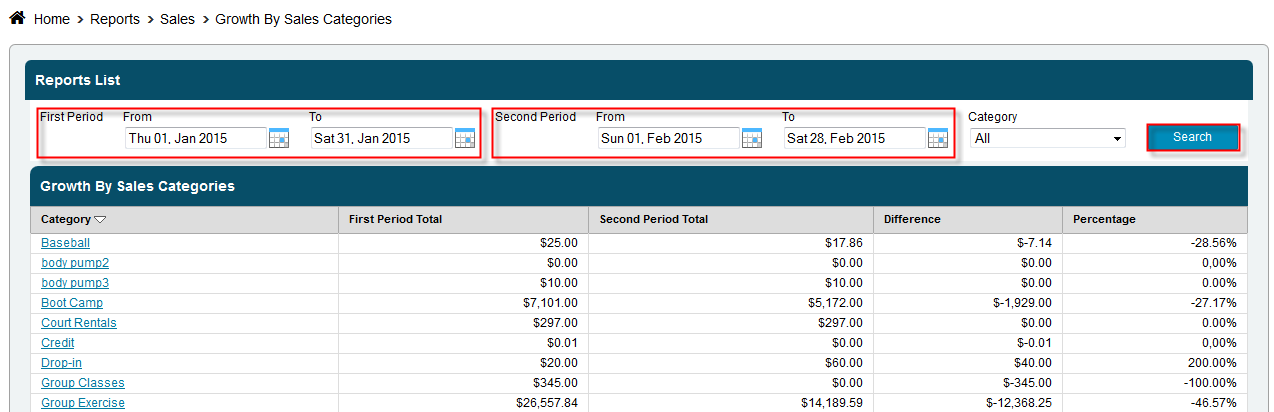
Keep track of sales for each category items and packages fall under. This report will demonstrate growth by showing the sales between two selected day ranges. This difference will be shown as a dollar total, as well as a percentage total, to demonstrate growth.
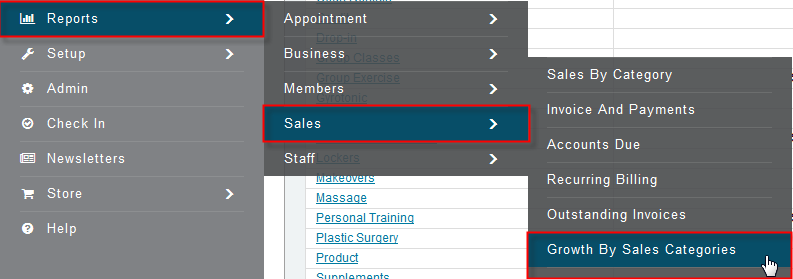
Click Reports>Sales>Growth by Sales Categories
- Select the date range for the First Period
- Select the date range for the Second Period
- Select category, or leave at All
- Click Search
Still need help?
If you can’t find what you’re looking for, our support team is happy to help.