

What's New – June 24th Release
Last updated on June 24, 2026
What's New in Member Manager
Release Date: Wednesday, June 24, 2026
This release helps you get more of your members onto Member Portal, keeps your delinquency reporting on autopilot, and introduces a new AI-powered way to spot members who look active in your system but aren't tied to a contract or sessions.
Portal Enrollment Gap Report
Members who joined before automatic Portal account creation may still not have a Member Portal login. There's now a report that finds every customer who's eligible for a Portal account but doesn't have one yet — and lets you create their logins right from the report.
What It Does
- Finds the gap. The report lists every customer who is eligible for a Member Portal account but doesn't currently have a login.
- Shows you what you need. For each customer you'll see their name, email, phone, and contract status, so you know who you're inviting.
- Flags anything blocking a login. If a customer is missing an email or date of birth, the report tells you — those are required before a login can be created, so you can fix the record first.
- Creates logins in one click — or in bulk. Generate a login for a single customer, or select many (or all eligible) and create them together. Each customer receives a verification email to set up their account.
How to Use It
- In Member Manager, go to your Reports area and open the Portal Enrollment Gap report.
- Review the list of customers without Portal logins.
- Select the customers you want to invite (rows with a missing email or date of birth can't be selected until you fix the record).
- Click Generate Login — or use Generate Selected / Generate All for bulk.
- Confirm when prompted. Each customer gets a verification email to finish setting up their Portal account.
Delinquency Report — Now Available as a Scheduled Email
You can now add the Delinquency Report to your scheduled email reports, so it arrives in your inbox automatically on the schedule you choose — no need to log in and pull it manually.
What's New
- The Delinquency Report can be added to scheduled email reporting, just like your other scheduled reports.
- It's delivered as a PDF attachment on your chosen schedule (daily, weekly, etc.).
- Setup works exactly the same way as the other reports you already schedule.
AI Data Hygiene: Active Members Without a Contract or Sessions
It's easy for members to stay marked Active in your system long after their contract has lapsed and their sessions have run out. They inflate your active counts, but they aren't tied to anything that's actually billing or being used. The new Data Hygiene dashboard finds these members for you automatically.
What It Does
- Scans every night. A nightly scan checks your active members and flags anyone who is marked Active but has no active contract and no active sessions.
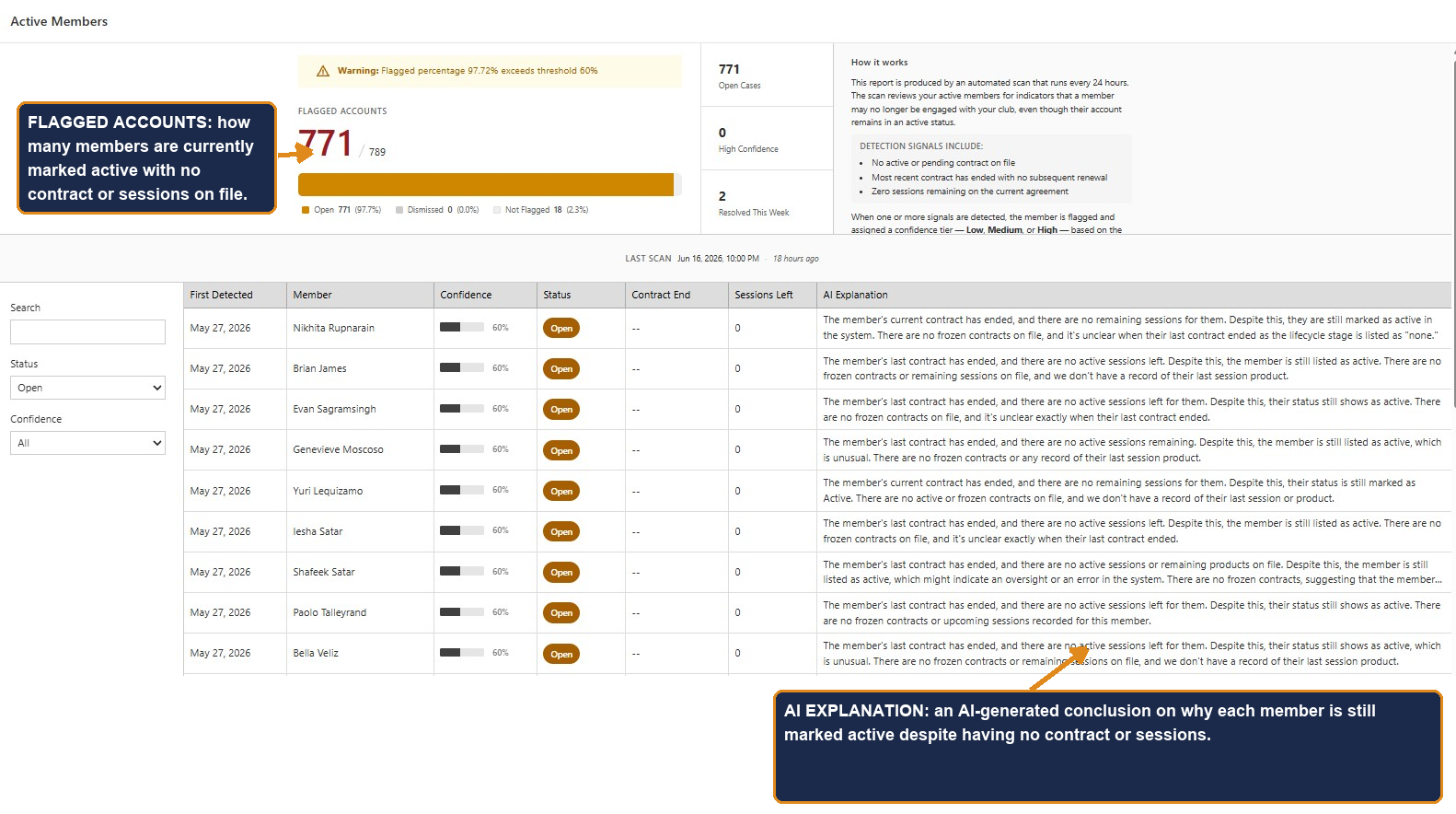
- Shows them in one place. A new Data Hygiene dashboard (under the AI section in your sidebar) lists every flagged member, with sorting, filtering, and search.
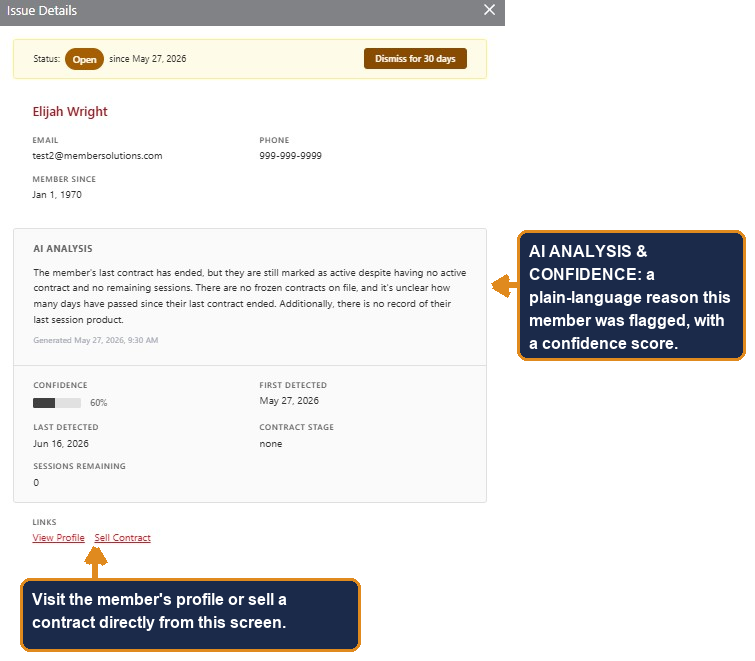
- Explains each one with AI. Open any flagged member to see an AI-generated explanation of the most likely reason they're flagged — along with a confidence score — plus their contract history and session summary.
- Points you to the next step. From a flagged member you can jump straight to their profile or start a new contract sale — turning a data gap into a potential renewal.
- Keeps itself honest. The dashboard tells you when it last scanned and warns you if results may be out of date, so you always know you're looking at current information.
See It in Action
The Data Hygiene dashboard shows every flagged member at a glance — including how many accounts are currently flagged and an AI explanation for each one.
Open any member to see the full AI analysis and confidence score — and act on it right there, by viewing their profile or starting a contract sale.
Important: It Finds, You Decide
How to Turn It On
Data Hygiene is available per club and is controlled by a feature setting and staff permissions. If you'd like it enabled for your club, contact your account manager or MSI support, and we'll help you switch it on and set staff access.
Still need help?
If you can’t find what you’re looking for, our support team is happy to help.
Still need help?
If you can’t find what you’re looking for, our support team is happy to help.