

Use Webcam to Capture Staff Profile Pics
Last updated on February 05, 2026
Use Webcam to Capture Staff Profile Pics
Use Webcam to Capture Staff Profile Pics
[data-colorid=het36ijuwa]{color:#ff5630} html[data-color-mode=dark] [data-colorid=het36ijuwa]{color:#cf2600}[data-colorid=me7xq2l0e2]{color:#ff5630} html[data-color-mode=dark] [data-colorid=me7xq2l0e2]{color:#cf2600}[data-colorid=tb5ioa1mee]{color:#ff5630} html[data-color-mode=dark] [data-colorid=tb5ioa1mee]{color:#cf2600}[data-colorid=sxjqgk9o1b]{color:#ff5630} html[data-color-mode=dark] [data-colorid=sxjqgk9o1b]{color:#cf2600}Supported Browsers: Chrome, Firefox, Edge
Go to Staff and search. Click the staff member’s name to go to their profile page.
- Just below the current staff photo or place holder (if no photo is present), click Use Webcam.
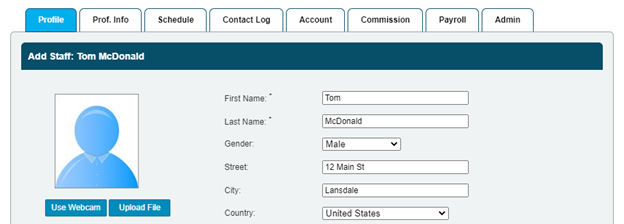
- Upon clicking Use Webcam, you may receive a system alert asking to access your webcam. If you give the software access to your webcam, then staff profile picture will be replaced with a live image from your webcam.
Note: The image will appear slightly cropped. This is a result of the webcams resolution being 16:9 and the image space being a square 50x50 px.
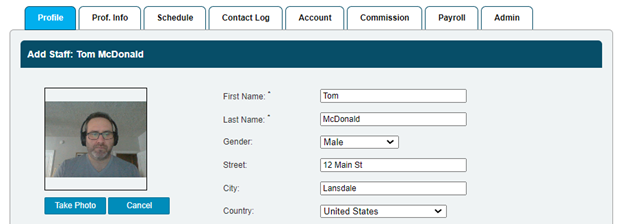
- Click Take Photo to save the image and profile. The user will now have the option to take another photo using the webcam, or delete the existing via the trash can icon to the right of the image.
Note: The image will appear slightly compressed. This due to the camera sensor capturing images in 16:9 and the image being stored and displayed as a square 50x50 px.
- If you upload or take a new photo using the webcam, it will over-write the existing image. If you delete the image via the trashcan icon, the image will be removed and a placeholder image will be displayed.
Still need help?
If you can’t find what you’re looking for, our support team is happy to help.