

Staff Payroll
Last modified by Isaac Mejia on 2026/02/05 15:07
Last updated on February 05, 2026
Staff Payroll
Go to Staff tab and select the staff member. Once selected, click on the Admin tab and then click on Rates:
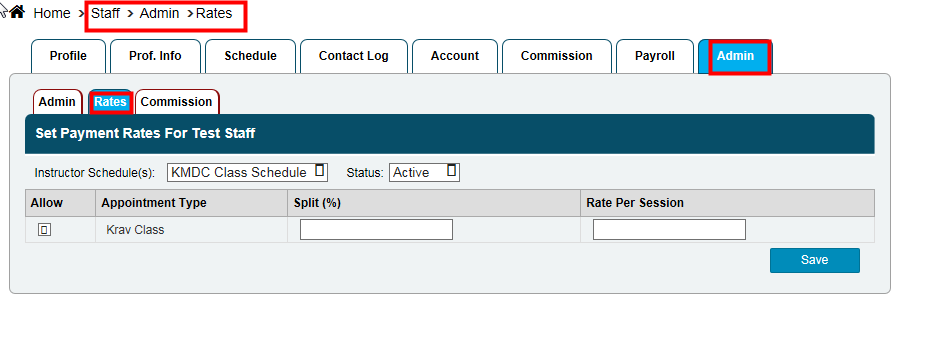
- Select the type of schedule you need to adjust the payroll for using the dropdown. Once selected you can choose the rates for each option:
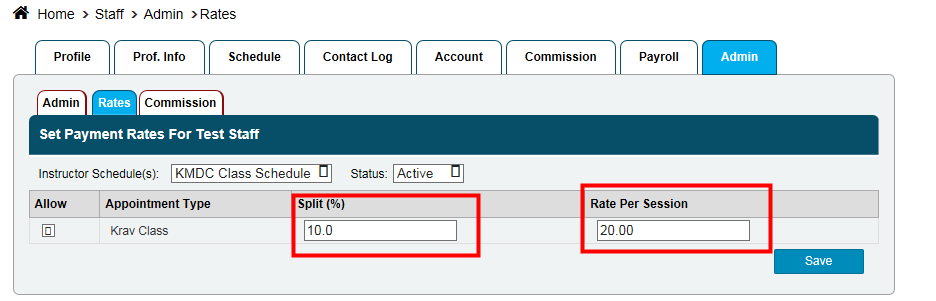
A. Split (%) refers to the percentage split between the company and the staff. In the case above, this staff member gets 10% on every class.
B. Rate per Session refers to the dollar amount the staff receives for each session. In the case above, this staff member gets $20.00 for every session.
C. You can also make it so they get both a percentage and a $ amount for a single session.
Still need help?
If you can’t find what you’re looking for, our support team is happy to help.