

Recurring Billing Report
Last modified by Isaac Mejia on 2026/02/05 15:22
Last updated on February 05, 2026
Recurring Billing Report
Recurring Billing Report
Recurring Billing Report
See which of your members have purchased items that recur on their account every month, for example membership dues.
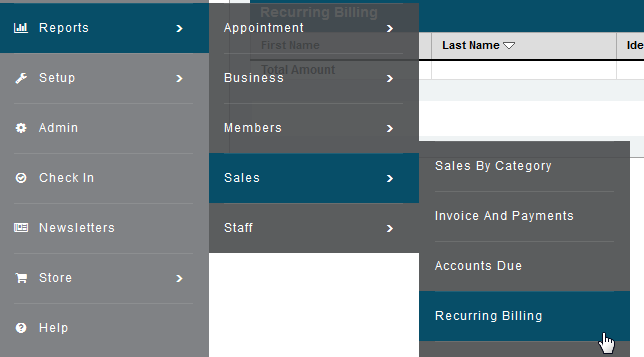
- Click Reports>Sales>Click Recurring Billing
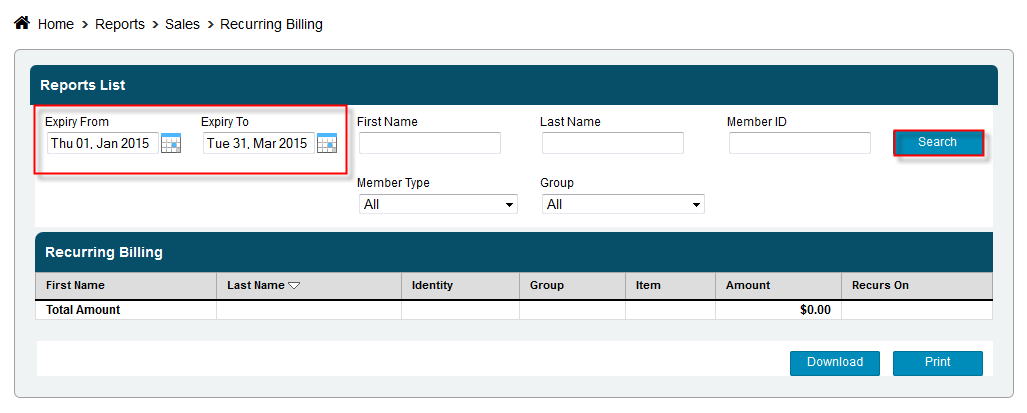
- Select a specific due date or leave as the entire month
- Enter a member’s name or leave the fields blank to return results for all the members
- Click Search
Still need help?
If you can’t find what you’re looking for, our support team is happy to help.