

Dashboard Quick Stats
Last updated on February 05, 2026
Dashboard Quick Stats
Dashboard Quick Stats
[data-colorid=cc0opqu0oz]{color:#ff5630} html[data-color-mode=dark] [data-colorid=cc0opqu0oz]{color:#cf2600}[data-colorid=ofu65fe3y5]{color:#ff5630} html[data-color-mode=dark] [data-colorid=ofu65fe3y5]{color:#cf2600}[data-colorid=wzc9xki44u]{color:#ff5630} html[data-color-mode=dark] [data-colorid=wzc9xki44u]{color:#cf2600}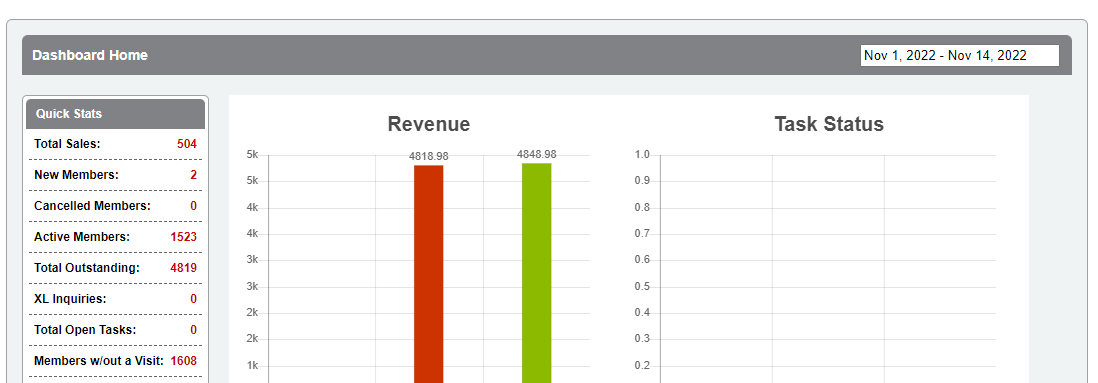
Below is a list of descriptions for the Quick Stats on your Member Manager Dashboard. Stats show for the period selected on the right. Note: All stats may not show depending on user/staff permissions.
Total sales – Total value of contracts, packages and products sold.
New members – Total number of new member records added during the period selected.
Cancelled members – Total number of members who cancelled a contract or package.
Active members – Total number of active member records as of today. Note: This refers to the status of the member profile record, and not the contract or renewing package status.
Total outstanding – Total value of past due invoices. In the event of overpayments, this field value may be displayed as negative.
XL Inquiries – Total number of members who inquired about cancelling their membership. Member Solutions Full Service billing clients only.
Total Open Tasks – Total number of open and past due tasks for staff members. Owners will see all tasks; staff members will see their specific tasks.
Members w/out a visit – Total number of members who have not checked in for a class or appointment.
Still need help?
If you can’t find what you’re looking for, our support team is happy to help.