

Accounts Due Report
Last modified by Isaac Mejia on 2026/02/05 15:22
Last updated on February 05, 2026
Accounts Due Report
Member Solutions Product Support : Accounts Due Report
Accounts Due Report
See how much is on a members account at any given time. You can specify to see all members by the date their account is due, or look at a specific member.
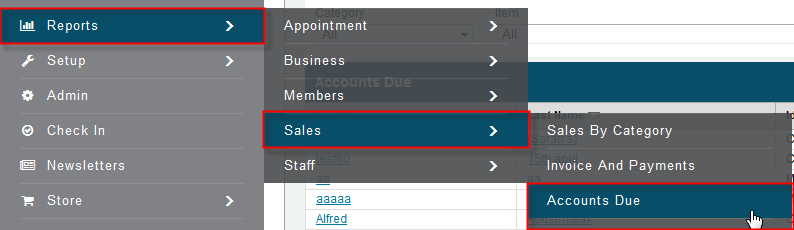
Click Reports>Sales>Accounts Due
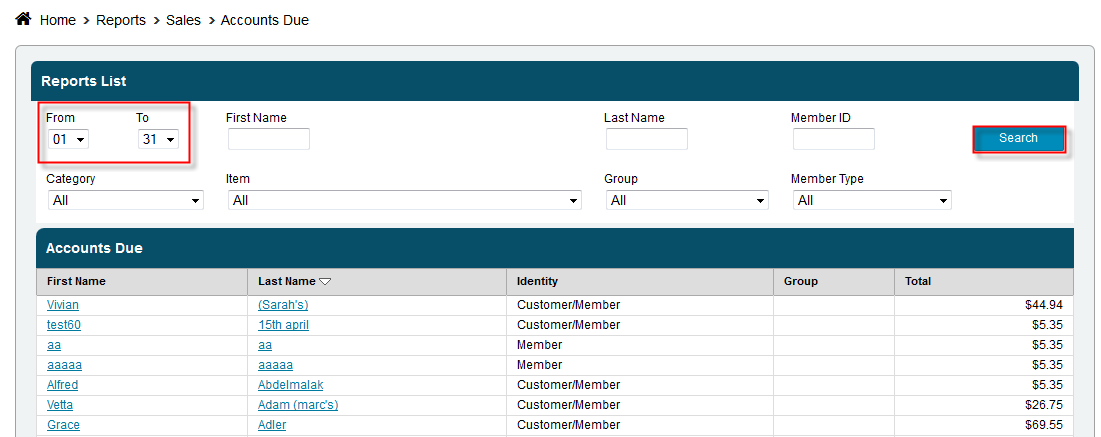
- Select a specific due date or leave as the entire month
- Enter a member’s name or leave the fields blank to return results for all the members
- Click Search
Still need help?
If you can’t find what you’re looking for, our support team is happy to help.