

Resetting Staff Password
Last updated on February 05, 2026
Resetting Staff Password
Follow these steps to reset a staff member’s password from the admin staff login.
Click Staff
Click Search for a list of your staff members
Select the staff member you need to reset to go to their profile.
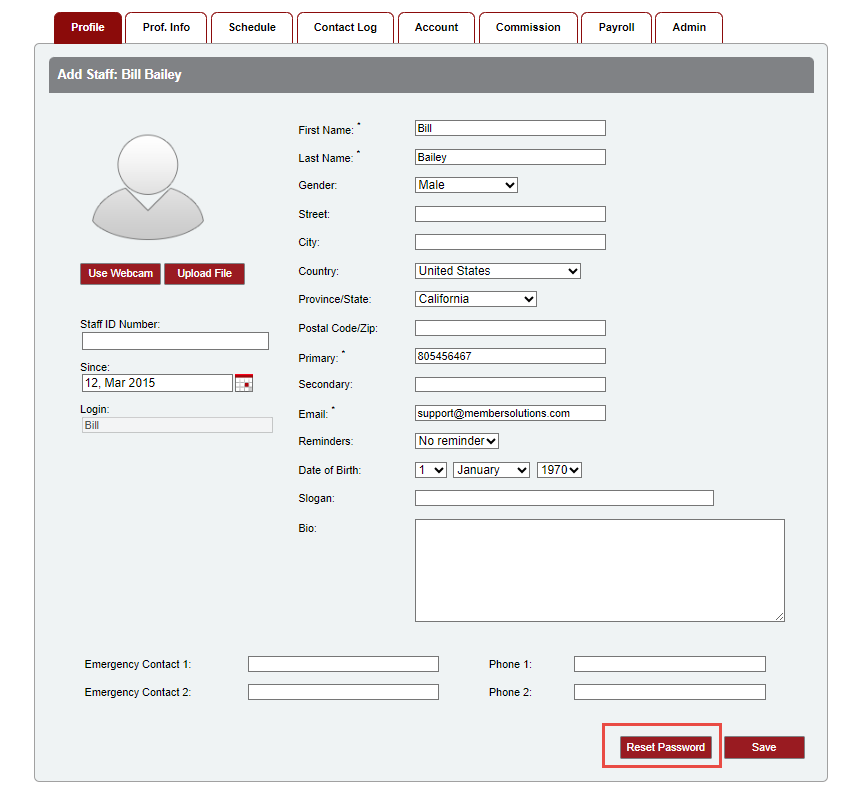
At the bottom of the staff profile, will be an option to Reset Password. Clicking that, will send a reset email to the email address in the staff profile. Your staff member can use that to update their password.
Note: A staff member can also use the Forgot Password option from the login page. Staff members must get to the login page by going to your Member Manager site first. Example: mysite.myvolo.ca. If staff is having trouble logging in, be sure they are going to your site address and not directly to the idm.membersolutions.com login page. Your myvolo.ca URL will redirect to the idm.membersolutions.com page, but the system needs to know what site it is logging into.
Still need help?
If you can’t find what you’re looking for, our support team is happy to help.