

Personalize Your MyVolo System
Last modified by Isaac Mejia on 2026/02/05 17:08
Last updated on February 05, 2026
Personalize Your MyVolo System
There are many ways in which you can personalize your Volo site in order to configure your user experience and that of your staff and your members.
Click Setup
- Click Personalize
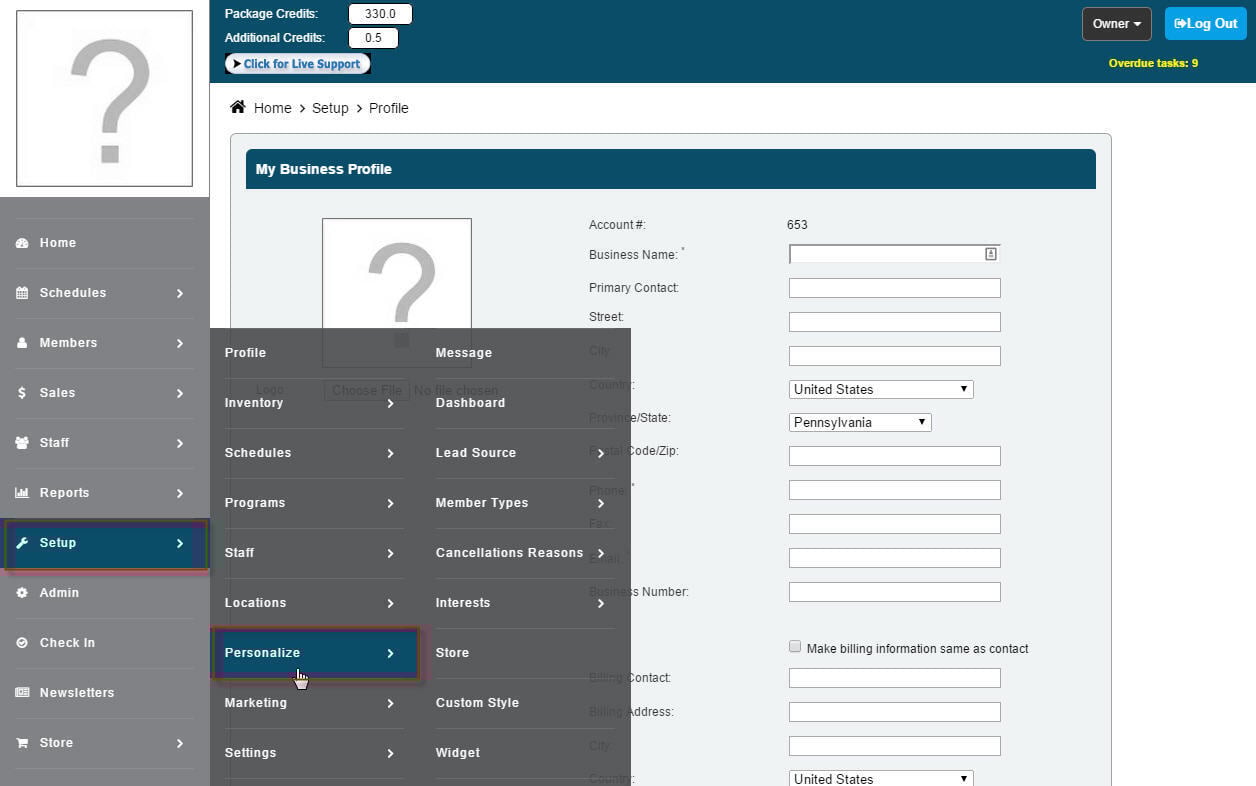
You will be presented with the following options:
- Edit and select the automated messages you would like your clients to receive
- Customize the member dashboard as you would like it to appear to your members
- Add and edit your lead sources
- Create member types
- Add and edit cancellation reasons for when you cancel appointments
- Add and edit your member Interests to suit your business
- Edit your policies for your online store
- Setup a widget for your customers to view and book on your schedule without being logged in.
- View/edit your contracts' custom details here
Create custom tabs for your member portal
- Create forms for your members to fill out through the member portal
Still need help?
If you can’t find what you’re looking for, our support team is happy to help.